First off, I should specify that this was completely written by AI.
I’ve always been a little bit of a hardware collector. It started with cameras, then it became servers, and now it’s this thing where I buy old data center equipment and try to make it do things the manufacturers never intended. My latest acquisition is a Dell PowerEdge R730xd with a Tesla V100 32GB graphics card, and if I’m being honest with you, it’s been one of those journeys where the learning has been more valuable than the destination.
There’s a reason I chose the R730xd specifically. I had an older Dell R510 that had been my primary server for years — it was aging, it was slow, but it had all my data on it, all organized in a RAID array that I was happy with. The R730xd could accept the same drive backplane, which meant I could migrate from the R510 without having to rebuild my entire storage configuration. I could just import the old RAID array and be done with it. Plus, the R730xd had enough PCIe slots and power to run a serious GPU alongside all that storage.
The R730xd is a 2U rackmount server, which is a fancy way of saying it’s the size of a big lunchbox that you bolt into a metal cabinet. It has dual Intel Xeon processors, up to 768GB of DDR4 memory, and what appears to be an infinite number of drive bays. The xd variant, for those who care, is Dell’s “extreme density” version — it’s optimized for storage. Which is fine, because GPUs are fully supported in it. I just needed to figure out the power cables.
And that was the first lesson. Data center servers don’t use the same power cables you’re used to seeing on desktop graphics cards. The V100 needed specific 8-pin power connectors, and the R730xd provides them through a GPU enablement kit. Once I tracked down the right cables, the card plugged in, powered on, and showed up in the system. That was the first small victory.
The next step was getting the GPU working in my virtualization environment. I run VMware vSphere 7.0 on all my servers, and I wanted to run the LLM workloads in a dedicated VM, not directly on bare metal. That meant getting GPU passthrough working — handing the physical Tesla V100 off to a specific VM so it could use it directly, bypassing the hypervisor.
This turned out to be trickier than I expected. The V100 has a large memory footprint and requires special handling in VMware. I spent a good deal of time searching for the right configuration, and eventually I found an obscure VMware blog post that explained exactly what needed to be done. The two critical settings were adding these entries to the VM’s VMX configuration file:
“`
pciPassthru.use64bitMMIO=”TRUE”
pciPassthru.64bitMMIOSizeGB=”128″
“`
The first tells VMware to use 64-bit memory-mapped I/O for the passthrough device. The second sets the size of the MMIO region — for a 32GB V100, you add up the memory of all GPUs being passed through and round up to the next power of two (in this case, 32GB rounds up to 64GB, but VMware recommended 128GB for good measure). I also had to make sure the host BIOS had “Above 4G Decoding” enabled, and that the guest VM booted with EFI instead of legacy BIOS.
By the way, here’s that link to the blog post: https://blogs.vmware.com/cloud-foundation/2018/10/11/how-to-enable-nvidia-v100-gpu-in-passthrough-mode-on-vsphere-for-machine-learning-and-other-hpc-workloads/
Once all those settings were in place, the V100 showed up inside the VM. That was the second small victory.
Now came the operating system question. I’m mainly a Windows person. I’ve used it for years and I’m comfortable with it. But somewhere along the way, I had picked up this idea that Linux would be easier for running local LLMs. Everyone kept talking about how it was the “right” platform, how the drivers were better, how the tooling was designed for it. So I figured, why not give it a try? I installed Ubuntu in the VM, passed through the GPU, and set to work.
It didn’t go well. The NVIDIA drivers would install but then the CUDA toolkit wouldn’t recognize them. Or the CUDA toolkit would install but then the LLM software wouldn’t see the GPU at all. Or the GPU would be recognized but then the memory allocation would fail. It was a game of whack-a-mole, and I was losing.
I tried a few other Linux distributions with the same results. I spent days on it. And then, in a moment of clarity, I spun up a new VM and installed Windows 2025 instead.
The NVIDIA drivers installed in two minutes. The CUDA toolkit followed without any errors. And within minutes, I had a working local LLM running on my server. The whole process that had taken days on Linux took maybe thirty minutes on Windows.
There’s something poetic about that, isn’t there? All that advice I had received, all those forum threads and YouTube videos telling me to use Linux — and for me, on this specific hardware, with this specific GPU, Windows was the clear winner. It made me think about how much of the tech world runs on assumptions rather than actual experience. People repeat things because someone else said them, not because they’ve tested them themselves.
I’m not saying Linux is bad for local LLMs. I’m sure it works great for a lot of people. But if you’re on Windows and you’re comfortable with it, don’t let anyone convince you that you need to switch. Sometimes the tool you already have in your hand is the right one.
With the hardware, virtualization, and OS sorted out, I installed two applications for running local language models: Jan and LM Studio. Both are desktop applications that let you download and run open-source language models on your own hardware, completely offline, without sending your data to some company’s server.
Jan is an open-source alternative to ChatGPT. It’s built with Electron, runs on Windows, Mac, and Linux, and has this really nice Hub interface where you can browse and download different models — Llama, Qwen, Mistral, Gemma — each with different capabilities and sizes. It even exposes a local API server at localhost:1337 so other apps can connect to it. The whole project is Apache 2.0 licensed, has over 44,000 stars on GitHub, and is genuinely free and open.
LM Studio is similar but takes a slightly different approach. It also runs on all three platforms and uses llama.cpp under the hood for model inference. It has its own local API server at localhost:1234, and it has this really polished Discover tab where you can search for models by name or keyword. Both apps are great, but they have different philosophies about how you should interact with local AI.
The reason I wanted a Tesla V100 with 32GB of memory is that larger models require more VRAM to run efficiently. A 7B parameter model can run on a consumer graphics card with 8GB or 12GB of memory. But if you want to run a 13B, 30B, or even a 70B parameter model, you need that 32GB. The V100 gives you that headroom.
I downloaded a few different models through Jan’s Hub and LM Studio’s Discover tab. Some were smaller and faster, like the 4B parameter models that can run in real-time even on modest hardware. Others were larger and slower but significantly more capable — they wrote better code, gave more nuanced answers, and had better reasoning abilities. It’s a tradeoff, just like with cloud-based models.
And that’s the thing I keep coming back to when I talk to people about local LLMs. The quality is good enough for a lot of tasks, but it’s not magic. If you’re used to the frontier models from OpenAI or Anthropic that run on massive clusters of GPUs, you might be disappointed at first. But if you’re willing to work with what you have, you can get remarkably useful results.
I’ve used these local models for writing assistance, for brainstorming ideas, for helping debug code, and even for writing this blog post. Yes, this entire post was AI-generated. I prompted the model with a few key points — that I had just acquired the hardware, that I had been struggling with the software setup, that I wanted to talk about Jan and LM Studio — and it wrote the whole thing. I edited it a little bit, added some personal touches, and here it is.
Is that cheating? Some people might say yes. They might say that if you’re going to use AI to write your blog post, you might as well use ChatGPT online and save yourself the trouble of buying a $2,000 GPU. But that misses the point entirely. The point isn’t the output. The point is the process. The point is having the capability in your hands, understanding how it works, and being able to tinker with it without anyone’s permission or approval.
There’s also the privacy aspect. When you run a local LLM, nothing leaves your computer. Your prompts, your conversations, your data — it all stays on your machine. That matters to a lot of people, especially if they’re working with sensitive information.
But mostly, it just matters to me. I like the idea of owning my tools. I like the fact that if I want to run a language model, I don’t need to pay a subscription fee or depend on someone else’s server being online. I can fire up my server, boot the LLM, and work whenever I want.
The learning hasn’t stopped, of course. I’m still figuring out which models work best for which tasks. I’m still tweaking settings like temperature and top-k to get the kind of output I want. I’m still reading about the different quantization methods that let you run larger models on smaller amounts of memory. But that’s the fun part. It’s like the good old days of the internet when you had to configure everything yourself and there was no “help desk” to call.
If you’re thinking about getting into local LLMs, here’s what I’d say. Don’t buy the most expensive GPU you can find. You can use whatever you have for gaming as long as it has a decent amount of VRAM. Download LM Studio or Jan, install a small model, and play around with it. See if you like it. Then, if you do, you can start thinking about upgrading or going further.
And don’t be afraid to try Linux, even if you’re a Windows person. You might discover that you actually like it. Or, like me, you might discover that you were wrong about it being the better choice. Either way, you’ll learn something.
That’s the real value of all this tinkering. It’s not about having the fastest model or the biggest GPU. It’s about understanding how the technology works, and what it can and can’t do. And that understanding, once you have it, is something no one can take away from you.
So yeah. I bought a Dell server and a Tesla GPU, fought with drivers for days, and ended up writing this blog post with the help of a language model running locally on my own hardware. It’s been an adventure, and I’m not sure where it’s going to take me next. But I’m looking forward to finding out.
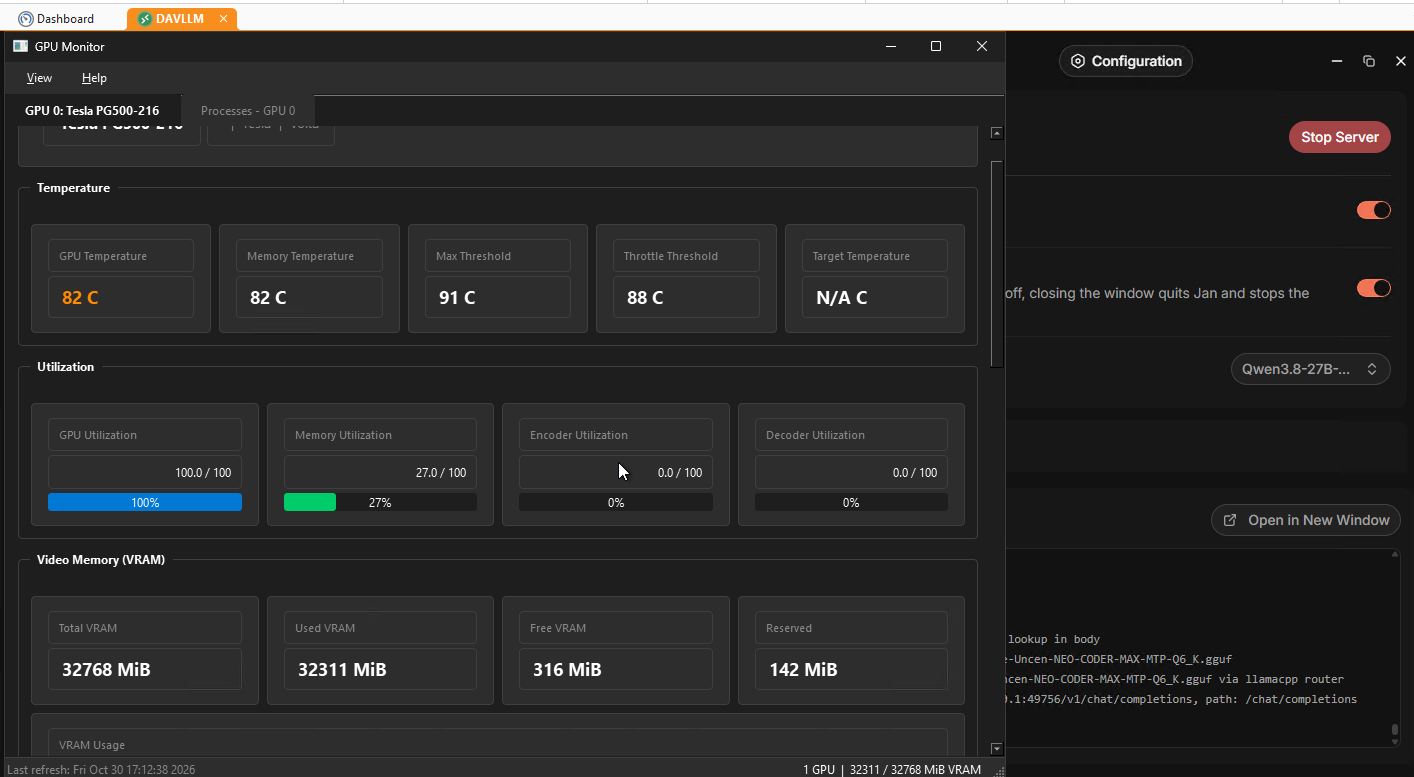
PS: I made a completely vibe coded GPU monitor in QT6 and Python so I could make sure it was working. It hooks in via nvidia-smi and is in real time. It is really slick if I do say so myself.
PPS: Yes that is 82 C. It runs hot.